
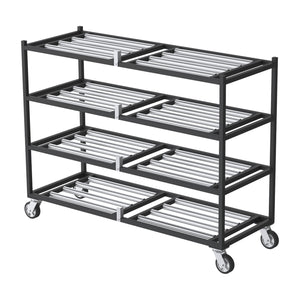
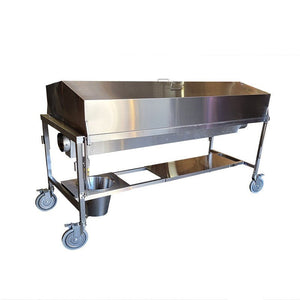


Shop Upright Mortuary Coolers
Compare the actual equipment below, choose the required options and add an eligible configuration to your cart. Quote-only and configured systems retain their dedicated product path.
- Choose the equipment
- Select options and quantity
- Review your cart or itemized quote

THE USA
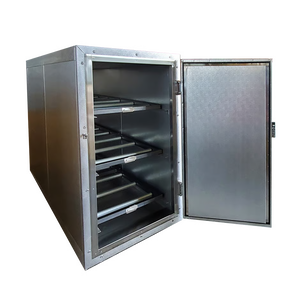
American 2 Body Upright Mortuary Cooler Shell – Extra Wide
 Estimated from
American 2 Body Upright Mortuary Cooler Shell – Extra Wide
$4948.9
Check financing
Equipment estimate. Approval required. Tax and delivery extra.
Estimated from
American 2 Body Upright Mortuary Cooler Shell – Extra Wide
$4948.9
Check financing
Equipment estimate. Approval required. Tax and delivery extra.
Built to orderPO accepted

THE USA
American 2 Body Upright Mortuary Cooler – Extra Wide
Estimated from
American 2 Body Upright Mortuary Cooler – Extra Wide
$8516.21
Check financing
Equipment estimate. Approval required. Tax and delivery extra.
Built to orderPO accepted

THE USA
American 3 Body Upright Mortuary Cooler – Extra Wide
Estimated from
American 3 Body Upright Mortuary Cooler – Extra Wide
$8814.71
Check financing
Equipment estimate. Approval required. Tax and delivery extra.
Built to orderPO accepted

THE USA
American 3 Body Upright Mortuary Cooler – Standard Width
Estimated from
American 3 Body Upright Mortuary Cooler – Standard Width
$8357.01
Check financing
Equipment estimate. Approval required. Tax and delivery extra.
Built to orderPO accepted
Resources
Upright Mortuary Cooler Tier Channel Mounting Guide
How the roller tiers mount in AMC 2B, 2BX, 3B, 3BX and 4BX upright mortuary coolers, how to move a tier to a new height, and a printable quick sheet with drawing.
Upright Mortuary Cooler Tier Channel Mounting Guide
One of the most common calls we get on the AMC upright line is how the tiers mount, and whether they can be moved. The short answer: every AMC 2, 3 and 4 body upright mortuary cooler uses the same tier system. Each roller tier is a removable frame that rests on angle channels, and each channel is fastened straight into the cabinet wall with four screws. A tier can sit at any height where the wall is reinforced, and you can move it later.
This page covers the 2B, 2BX, 3B, 3BX and 4BX. The same sheet is included as page 11 of each model's user manual.

How the tiers are held
Look inside the door and you'll see an angle channel on each side wall under every tier. The vertical leg of the channel sits flat against the wall and takes the four screws. The roller frame sits on the horizontal leg. Nothing else holds the frame in place, so it lifts straight off once the tier is empty.
Because the channel only needs a reinforced section of wall, the tier is not locked to one position. If you add body trays, store larger pouches or set aside a tier for a bariatric case, the channels can be moved up or down to give that tier more room.
Moving a tier
- Empty the tier and lift the roller frame off its channels.
- Remove the four screws from each channel and take the channels off the wall.
- Measure the new height from the cabinet floor and mark both side walls at the same height, on a reinforced area.
- Hold each channel level and fasten it with all four screws.
- Seal the old screw holes with a refrigeration-grade sealant so moisture stays out of the wall panel.
- Set the roller frame back on both channels and check that it sits flat and level side to side.
- Roll an empty tray across the tier to confirm clearance under the tier above before loading.
Before you fasten
- Fasten only where the wall is reinforced. If you are not sure where that is on your cabinet, call 1-888-792-9315 with your serial number before drilling.
- Use all four screws in every channel.
- Keep left and right channels at the same height.
- Leave room for the tallest tray, pouch or case you plan to store.
- The rollers should turn freely once the frame is seated.
Factory tier layout by model
| Model | Tiers | Factory spacing | Manual and guide |
|---|---|---|---|
| 2B · 2BX | 2 | 23½″ between tiers | 2B · 2BX user manual · 2-body cooler guide |
| 3B · 3BX | 3 | 16½″ between tiers | 3B · 3BX user manual · 3-body cooler guide |
| 4BX | 4 | Set at the factory | 4BX user manual · 4BX bariatric guide |
Cabinet sizes, clear door widths and casters are listed in each manual. Still deciding between models? The 2, 3 or 4 body upright sizing guide and the roller rack and body tray selection guide cover capacity and tray choice.

Tier channel mounting quick sheet
One printable page with the drawing, steps and factory spacing. Its QR code links back to this guide, so you can post it on the cooler or prep room wall.
More install sheets and manuals are in the equipment user manuals library and the forms and documents library. For service questions, visit tech support.
Compare cold storage around the space and loading plan
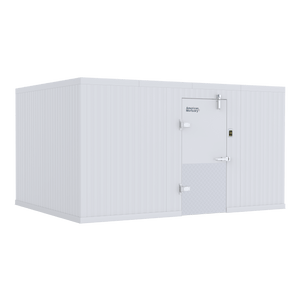
Start with the equipment you need to move into storage, the usable room dimensions and the available access route. An upright refrigerator, a roll-in cooler and a walk-in system are different configurations; compare their actual listings before choosing.
- Capacity and access: confirm the listed storage arrangement and loading direction.
- Fit: compare exterior and usable dimensions, door clearance and the delivery route.
- Configuration: identify refrigeration, floor, rack and tray selections separately.
- Project scope: confirm utilities, delivery requirements and the applicable written warranty.
Plan a phased mortuary-cooler replacement
Start with an inventory of the equipment in service, its dimensions and the workflow that must stay available during replacement. Identify the units needed first, the interfaces that must remain compatible and the later phases you want to budget. Separate a planning quantity from an approved purchase.
- For each phase, identify the model or specification, quantity, delivery location and intended purchasing period.
- Record dependencies such as door clearances, loading direction, transfer height, tray size, floor conditions and utilities where relevant.
- Request separate line items for equipment and selected accessories so the order can be reviewed by location and fiscal period.
- Review quote validity, current availability and delivery requirements before approving each phase; a planning quote is not a promise of a fixed future price.
Request a phased equipment or multi-location quote with the first purchase and later requirements clearly identified. Use the same approach for an independent facility, a public department or a corporate equipment-replacement program.
For several products or locations, request an itemized Upright Mortuary Coolers quote with selected models, quantities and delivery ZIP codes. Use general customer support for selection questions, and review the written warranty terms before ordering.
Plan year-end equipment purchases around the actual equipment and timing
Review current catalog prices, choose the required configuration and separate the first purchase from later replacement phases. Build an itemized priced quote, or request a formal equipment quote with quantities, locations and your purchasing period. Request written price validity rather than assuming an unannounced future price increase or an additional sale discount.
Can Section 179 affect an equipment purchase?
For tax years beginning in 2026, IRS Revenue Procedure 2025-32 sets a maximum Section 179 expense deduction of $2,560,000, reduced when qualifying property placed in service exceeds $4,090,000. These are statutory limits, not a promise that this purchase or every buyer qualifies.
The IRS explains that property is generally placed in service when ready and available for its specific use. Eligibility, business use, taxable income and other requirements matter; ordering, financing or paying before year-end does not by itself establish a deduction. Confirm treatment and timing with your tax professional before relying on a tax benefit.
Use our 2026 Section 179 planning guide and illustrative calculator alongside the selected model's requirements. Confirm freight, installation responsibilities and availability separately; a year-end planning request is not a delivery guarantee.
Compare your options. Choose your next step.
One source for funeral supplies and mortuary equipment, with nationwide shipping. Review the Upright Mortuary Coolers selection, compare product specifications and current pricing, then order the configuration you need or request an itemized quote.
- Choose the modelCompare the details against the work you need to do.
- Set your quantitiesReview the selected options and equipment subtotal.
- Buy or request a quoteReview freight, tax and available payment terms separately.
Need several items or delivery to more than one location? Include the models, quantities and delivery ZIP codes in your request. For general questions, contact customer support.